


LumaSlide
Download on the App StoreDownload on the App Store

Your photos, finally
on the big screen.

LumaSlide turns your Apple TV into a photo gallery. Full resolution, at your pace, with transitions you choose.

Download on the App StoreDownload on the App Store

See what it does

Apple TV, iPhone, iPad, Mac and Apple Watch. One purchase covers them all.

Volcanic cinder cones above a sea of clouds at sunset, filling an Apple TV screen, with the capture location and camera settings shown discreetly in the corner

Why LumaSlide

You decide how your photos are shown.

Whether it is a selection for a client or the pictures from your last trip, pacing decides a presentation: how long a photo stays, how it changes, when it moves on. LumaSlide puts all three in your hands.

  • Display time per photo from three seconds to a full minute
  • Four transitions, from a hard cut to a slow Ken Burns move
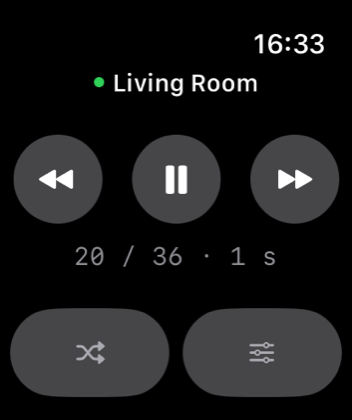
  • Pause and change photos instantly, from the Apple TV remote, iPhone or Apple Watch

The difference

Four things photographers buy it for.

Everything below reads from your own files. Nothing is retyped, nothing is uploaded.

Camera data on screen

Aperture, shutter, ISO and focal length as a quiet overlay, read from the file. Body and lens as well, if you want them.

Where it was taken

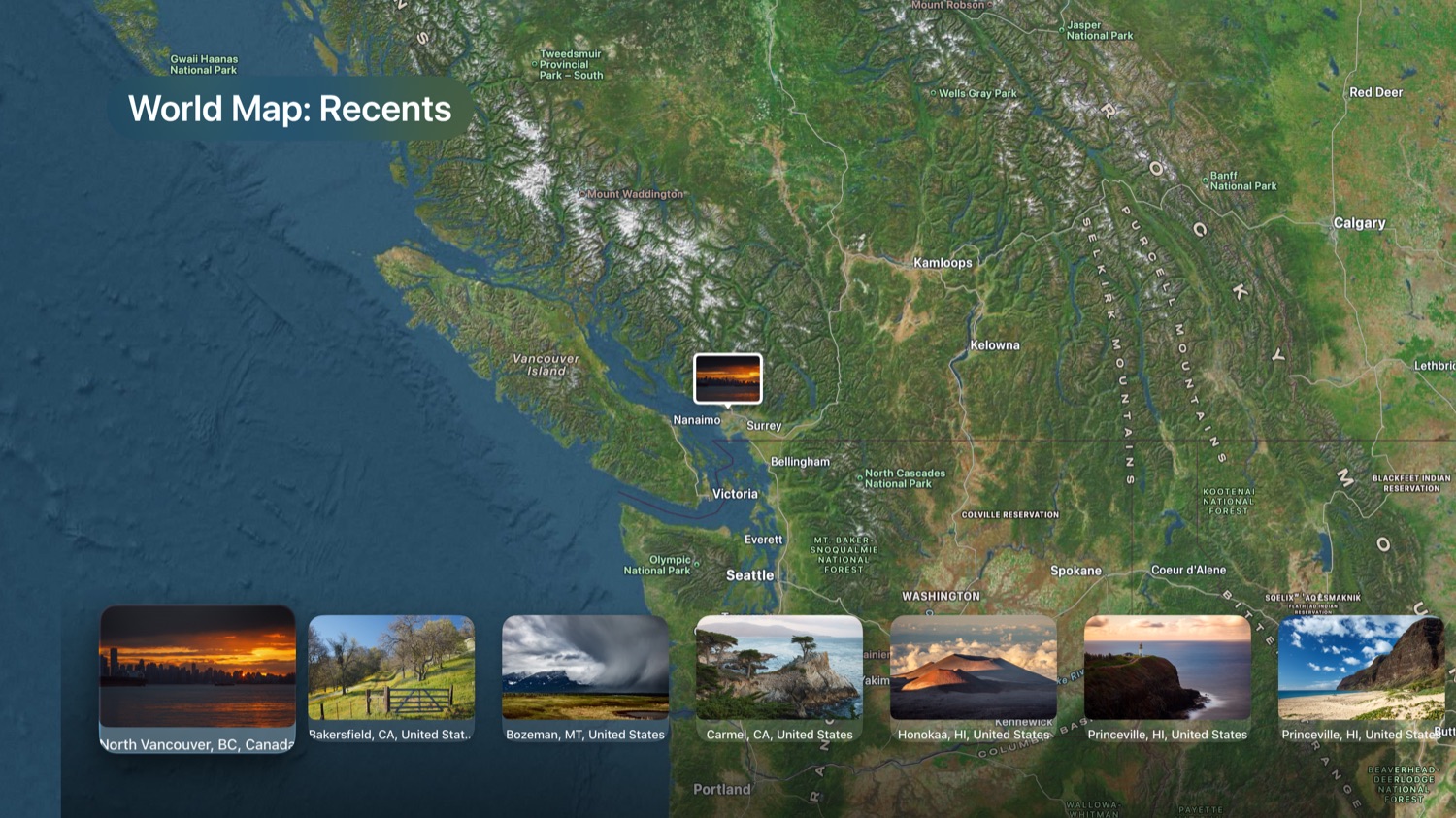
The place name from the GPS data in the file, plus a satellite map showing every location in the album.

Framing from your phone

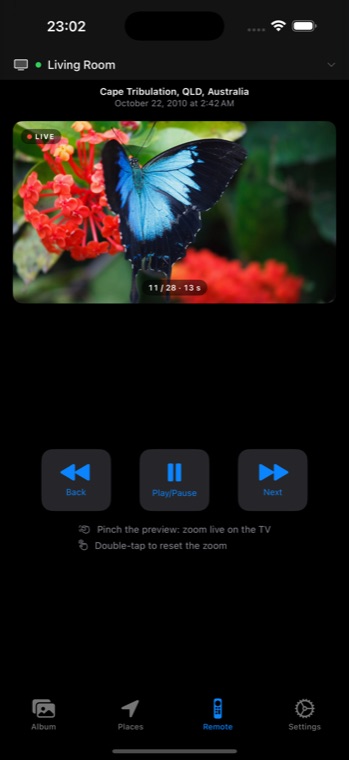
Pinch and drag the live preview. The television glides to the new framing in one slow move, in front of your audience.

Favourites only

One switch shows just the photos you starred, without building a new album first.

Full resolution

Built for the files your camera actually produces.

LumaSlide loads every photo at its native resolution, so a 45 megapixel frame stays a 45 megapixel frame. Nothing is resized to a convenient size on the way to the screen. Zoom in and the detail is still there.

  • No downscaling, no visible compression
  • Fill the screen or show the whole frame, your choice
  • Videos play with optional sound
Apple TV showing a world map with photo thumbnails pinned to their capture locations

The remote

Choose the framing from your phone.

Pinch and drag the live preview on your iPhone. Let go, and the television glides to that framing in one slow, deliberate move. Your audience never sees you searching, only the result.

  • Live preview of what is on screen right now
  • Smooth zoom, timed to look cinematic
  • Works from iPad, Mac and Apple Watch too
iPhone showing the LumaSlide remote with a live preview of the current photo

Cinematic transitions

A hard cut, a crossfade, a fade through black or a slow Ken Burns move between photos.

Camera data

Aperture, focal length, shutter and ISO as a discreet overlay. Body and lens on demand.

Capture locations

Place names from the GPS data in your files, plus a satellite map of the exact spot.

Favorites only

Show just the frames you marked, without building a separate album first.

Your existing albums

Works with the albums already in your photo library. Nothing to import or sync.

One purchase, no subscription

Buy it once for all your devices. No account, no renewals, nothing to cancel.

One purchase, every device.

Buy LumaSlide once and it is yours on Apple TV, iPhone, iPad, Mac and Apple Watch. On iPad and Mac it plays albums full screen without a television.

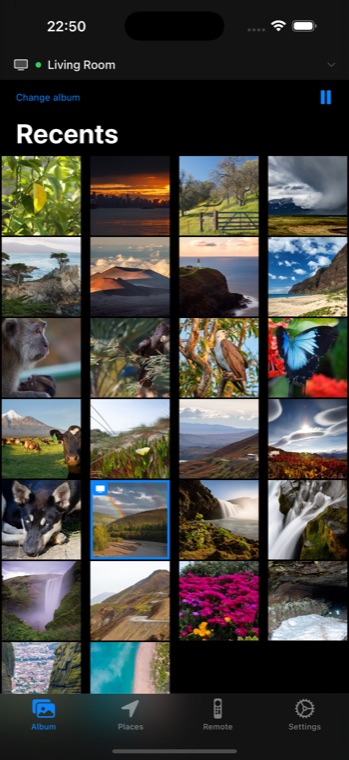
iPhone showing an album as a grid of photos iPad showing a photo full screen with the capture location below Apple Watch showing playback controls and the photo counter

Questions before buying

Does it need iCloud Photos?

No. LumaSlide reads the photo library on the device it runs on. If you use iCloud Photos, pictures stored in the cloud are fetched when needed. Without iCloud it works with what is on the device.

Which albums show up?

Your own albums and folders from the Photos app, plus the system smart albums such as Recents and Favorites. Empty albums are hidden.

Shared albums and shared libraries?

LumaSlide reads the same library the Photos app shows on that device. Shared albums have not been tested in depth, so if something is missing, write to me and I will look into it.

Live Photos and videos?

Videos play in the slideshow, with sound if you want. Live Photos are shown as their still frame.

RAW files?

Yes. The system delivers the processed full size image of a RAW file, which is what you see in the Photos app as well.

HDR photos?

HDR photos are shown in standard dynamic range for now. The extra brightness information of the gain map is not used yet.

Which devices does it need?

Apple TV HD or Apple TV 4K with tvOS 17, iPhone and iPad with iOS 17, Apple Watch with watchOS 11, and Mac with Apple silicon or Intel running a current macOS.

Nothing leaves your devices.

No server, no account, no analytics, no advertising. Your photos are read on the device and shown on your screen. That is the whole story.

Download on the App StoreDownload on the App Store